Gaming & Entertainment

6 Best Gaming Headsets of 2026

The 6 best gaming headsets of 2026, from esports models to long-battery wireless picks, compared across sound, comfort and features.

By RankingDeals Updated: How we rank

As an Amazon Associate I earn from qualifying purchases. Advertising & Monetization Disclosure.

Quick answer

The best choice for most people is the Razer BlackShark V3 Pro (9.2/10). Sources praise its low latency, hybrid noise cancelling and battery life; the weight is the usual complaint.

Check price on Amazon

Also worth a look: SteelSeries Arctis Nova Pro Wireless (Best Premium Features); Logitech G PRO X 2 LIGHTSPEED (Best for Esports Sound); SteelSeries Arctis Nova 7 Wireless (Best Mid-Range Allrounder).

Top picks at a glance

1

Razer BlackShark V3 Pro

Best Overall
9.2/10

Our take

Sources praise its low latency, hybrid noise cancelling and battery life; the weight is the usual complaint.

Pros

  • Hybrid noise cancelling that works in a noisy room
  • Very long battery between charges
  • Several connection options for PC, console and mobile
  • Detachable microphone with a clear voice pickup

Cons

  • Heavy for long sessions
  • Console versions have a lower battery rating

Full review

The BlackShark V3 Pro is the headset we would point most people towards, because it combines the things a gamer actually notices every day: low-latency wireless, active noise cancelling, a very long battery and a detachable microphone. Razer claims about 10 ms of wireless latency on the 2.4 GHz connection, and the headset also supports Bluetooth, USB and a 3.5 mm cable, so it works with a PC, a console or a phone without extra adapters. Its 50 mm drivers are tuned for competitive play, with clear footsteps and a controlled low end rather than an exaggerated bass boost. RTINGS lists it among its PC gaming picks for adding noise cancelling to a long battery life, and the guides that rank wireless esports headsets tend to place the BlackShark V3 family at or near the top. Razer rates the battery at up to 70 hours on a PC, which in practice means charging it once every couple of weeks. The button leads to the version for PC and Mac. Console owners should look at the editions made for their platform, which keep the same design but change the wireless dongle and the lower battery rating on consoles. The trade-off is size. At around 367 g it is heavier than the standard BlackShark V3 and than many rivals, and the fit is more of a snug esports clamp than a pillowy lounge headset. People with larger heads or who wear glasses for long sessions should consider the Arctis Nova line instead. It is also not the cheapest way into wireless gaming audio, so buyers who only need the basics will find better value further down this list. If you want one headset for ranked matches, calls and the commute, this is the safest pick.
2

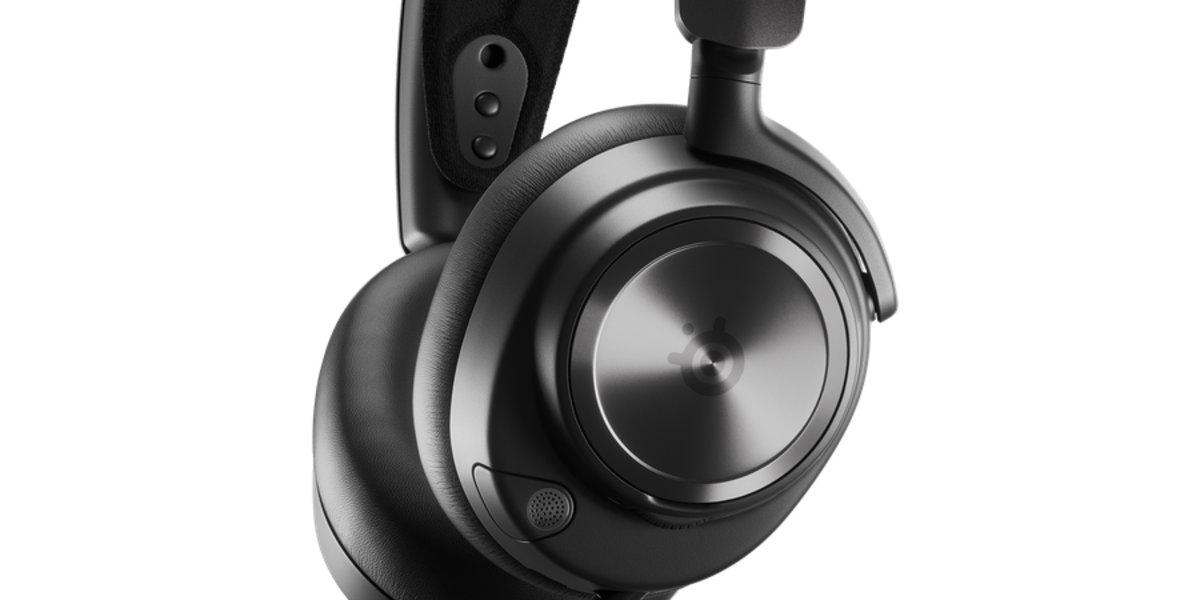
SteelSeries Arctis Nova Pro Wireless

Best Premium Features
9.1/10

Our take

A feature-rich premium headset praised for sound, noise cancelling and swappable batteries.

Pros

  • Swappable batteries remove charging downtime
  • Base station with display and quick source switching
  • Detailed high-resolution sound
  • Transparency mode for hearing the room

Cons

  • Needs the base station and desk space
  • Synthetic leather cushions can wear with time

Full review

The Arctis Nova Pro Wireless is the headset for people who want a complete audio hub on their desk. Its base station charges a spare battery, shows settings on a small display and switches between sources, so you never have to stop playing because the battery ran out: when one battery is low you swap it for the charged one. SteelSeries lists a 4-microphone hybrid noise cancelling system with a transparency mode, and both 2.4 GHz and Bluetooth can be active at the same time. Xataka picks it as the best overall option in its gaming headset guide, highlighting sound quality, noise cancelling and the unlimited battery idea. The drivers are 40 mm neodymium units capable of high-resolution audio, which gives a wider and more detailed presentation than most gaming models, especially in single-player games and music. The button leads to the version for PC, PlayStation, Switch and mobile. Xbox owners need the separate Xbox edition, which is otherwise the same headset. What you give up is simplicity and portability. The base station is a piece of hardware that needs a USB port and desk space, the headset is not designed to be thrown in a bag, and the synthetic leather ear cushions are reported to wear out with time. It also sits below the BlackShark V3 Pro in this list because that model offers similar noise cancelling in a lighter and simpler package with a single long battery. Choose the Nova Pro if you value the ecosystem, the swappable batteries and the sound over portability, and you move between a PC, a console and a phone at a fixed desk.

3

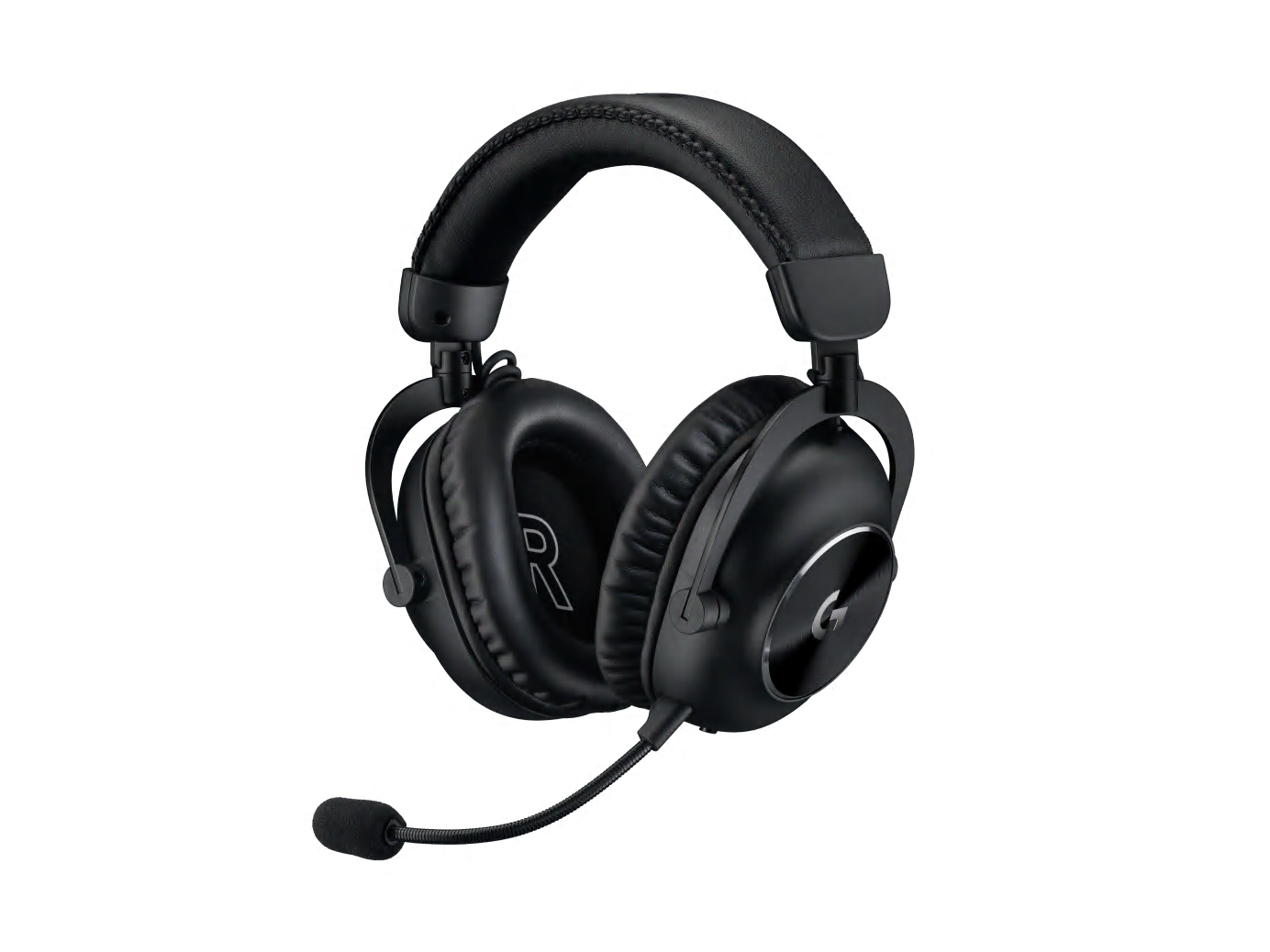
Logitech G PRO X 2 LIGHTSPEED

Best for Esports Sound
8.9/10

Our take

A well-built esports headset with clear graphene-driver sound but no noise cancelling.

Pros

  • Clear and balanced sound for positional awareness
  • Solid, durable construction
  • Wired option through the 3.5 mm jack
  • Detachable microphone with voice processing

Cons

  • No active noise cancelling
  • Bluetooth and 2.4 GHz cannot be used together

Full review

The PRO X 2 LIGHTSPEED is Logitech's esports headset, designed with professional players and built around 50 mm graphene drivers. RTINGS names it the best headset in Logitech's range, which says a lot given how crowded that catalogue is. The sound is clear and tonally balanced, with enough separation to follow positional cues in competitive shooters, and the DTS Headphone:X surround mode adds a virtual 7.1 option for those who like it. Connectivity covers the LIGHTSPEED 2.4 GHz dongle, Bluetooth and a 3.5 mm cable, and Logitech lists up to 50 hours of battery and a wireless range of up to 30 metres. The microphone detaches, which is handy for streaming or for using the headset as plain headphones, and it uses Blue VO!CE processing to clean up the voice. The design is the classic Pro X shape: a metal-and-leatherette build with a fixed, firm clamp that feels more like a studio headphone than a plush gaming throne. That is also where the compromises begin. There is no active noise cancelling, so it relies on passive isolation, and a few owners say the earcups press against glasses after long sessions. Reviewers also point out that Bluetooth and the dongle cannot be mixed, so you must choose one connection at a time. It ranks third because the two models above add noise cancelling or a longer battery, while this one is best for players who prioritise accurate sound and a recognisable, durable build for competitive play on PC and consoles.

4

SteelSeries Arctis Nova 7 Wireless

Best Mid-Range Allrounder
8.8/10

Our take

A comfortable, simple cross-platform headset that skips noise cancelling and the base station.

Pros

  • Comfortable and lightweight for long sessions
  • Works across PC, PlayStation and Switch with one dongle
  • Simultaneous 2.4 GHz and Bluetooth
  • Retractable microphone

Cons

  • No active noise cancelling
  • Shorter battery than the leaders on this list

Full review

The Arctis Nova 7 Wireless is the sensible middle of the SteelSeries range: it keeps the comfortable, lightweight design of the Nova family and the dual 2.4 GHz and Bluetooth connection, but leaves out the base station and the noise cancelling of the Nova Pro. RTINGS lists it as its mid-range PC pick and notes that it lacks noise cancelling and has a shorter battery life than the headsets above it, at roughly 33 hours as RTINGS measured. SteelSeries itself rates the original model at 38 hours. What you get in exchange is a headset that is simple to live with. The USB-C dongle works with PC, Mac, PlayStation and Switch, Bluetooth connects a phone at the same time, and the retractable microphone disappears into the earcup when you are not talking. The sound is bright and clear, and the app lets you tune the equaliser and use presets made for individual games. A word of caution about versions: SteelSeries has released a Gen 2 with a longer rated battery, and some retailers still list the original. This list covers the original Nova 7 Wireless, and the button leads to its listing, so check which generation you are buying and whether it is the one you prefer. It ranks fourth because the Nova Pro and BlackShark V3 Pro offer noise cancelling and more battery. Pick the Nova 7 if you want a reliable cross-platform wireless headset for long sessions at a lower level of complexity, particularly if you switch between a PC and a console and want a comfortable, lightweight build more than extra features.

5

HyperX Cloud III S Wireless

Best Battery Life
8.6/10

Our take

A comfortable, easy headset with the longest rated battery here and no noise cancelling.

Pros

  • Longest rated battery on the list
  • Comfortable memory-foam earcups
  • Bluetooth added to the 2.4 GHz dongle
  • Warm, full sound for action games

Cons

  • No active noise cancelling
  • Bluetooth has higher latency than the dongle

Full review

The Cloud III S Wireless continues the HyperX Cloud line, known for comfortable memory-foam earcups and a sturdy frame, and adds Bluetooth next to the 2.4 GHz dongle. Its headline feature is endurance: HyperX rates it at up to 120 hours on 2.4 GHz and up to 200 hours over Bluetooth, which is the longest figure on this list and means weeks of use without looking for a charger. The 53 mm drivers offer a warm, full sound that suits action games and movies, and the headset supports DTS Headphone:X spatial audio. The detachable 10 mm microphone is a simple, effective design that you can remove when you want to listen to music. It is a wireless headset first and a feature showcase second. There is no active noise cancelling, the Bluetooth link cannot match the 2.4 GHz connection for latency, and the design is more conventional than that of the premium models. Part of the confusion in the market is that the earlier Cloud III Wireless is now discontinued by the manufacturer, while this S version replaces it. Make sure you are looking at the S model. It ranks fifth because the headsets above it offer better sound tuning or noise cancelling, but for someone who hates charging and wants an easy, comfortable headset for long evenings on PC and PlayStation, the battery alone makes it a very strong choice.

6

Turtle Beach Stealth 600 Gen 3

Best Budget Wireless
8.4/10

Our take

A simple, long-lasting wireless headset that trades refinement for value.

Pros

  • Excellent battery life for its class
  • QuickSwitch between 2.4 GHz and Bluetooth
  • Flip-to-mute microphone with noise reduction
  • App with a ten-band equaliser

Cons

  • Mostly plastic build
  • No noise cancelling and less refined sound

Full review

The Stealth 600 Gen 3 is the entry point to wireless gaming audio on this list, and RTINGS picks it as its budget recommendation. Its standout feature is endurance: Turtle Beach rates it at up to 80 hours, and RTINGS measured around 85 hours of continuous use, which is far beyond what most headsets in its class can do. A quick-charge function gives several hours from a short top-up. It connects with a 2.4 GHz dongle or Bluetooth, and a QuickSwitch button lets you jump between them, so you can take a call on your phone while playing. The 50 mm drivers deliver a punchy sound that favours bass, and the flip-to-mute microphone is intuitive and includes noise reduction. The Swarm II app adds a ten-band equaliser for correcting the sound to your taste. The button leads to the version for PC and PlayStation. Turtle Beach sells a separate Xbox edition, so Xbox owners should choose that one instead. The compromises are what you would expect at this level. The build is mostly plastic, the sound is less refined than that of the premium models and there is no noise cancelling, only passive isolation. The microphone is good for chat but will not impress on a stream. Some listings describe noise control inconsistently, so do not buy it expecting ANC. It ranks sixth because it trades polish for value, not because it is a poor headset. For a younger player, a second headset or anyone who wants a wireless experience without a large investment, it is a very easy recommendation, and the battery means it rarely needs charging.

Frequently asked questions

Do I need active noise cancelling in a gaming headset?

It is not essential, but it helps if you play in a noisy room or a shared home. Most gaming headsets rely on passive isolation, so models with active noise cancelling are less common and usually heavier. If you mainly play in quiet conditions, spend that effort on comfort, microphone quality and battery life instead.

Is 2.4 GHz wireless better than Bluetooth for gaming?

Yes for latency. A 2.4 GHz USB dongle gives a much faster connection than Bluetooth, which can add noticeable delay in fast competitive games. Bluetooth is still useful for taking calls or listening to music from a phone, so the best headsets offer both and let you use them at the same time.

Can one headset work on a PC and a console?

Often, yes, but check the exact version. Many brands sell separate editions for Xbox and PlayStation with a different dongle or licence, while a PC dongle usually works across several platforms. Wired 3.5 mm connections work almost everywhere, so a headset with that option is the safest choice for mixed setups.

How long should the battery of a wireless gaming headset last?

Anything above 30 hours is comfortable for most players, who then charge it once or twice a week. Manufacturers' figures are usually measured at moderate volume with lighting off, so real use is a little lower. Headsets above 70 hours need charging only every few weeks.

Buying guide

A good gaming headset does three jobs at once: it lets you hear where the action is coming from, it keeps your voice clear for teammates, and it stays comfortable for the length of a long session. In 2026 the market has settled around wireless models that connect through a USB dongle for low latency and add Bluetooth for a phone, and the real differences are now in noise cancelling, battery life, weight and how well each headset works across a PC and consoles. We compared the recommendations of RTINGS, PC Gamer, Tom's Hardware, TechRadar and Xataka, together with the specifications published by each manufacturer, and picked six headsets that cover the most common ways people play. The list starts with a headset that balances the features most buyers care about, followed by a premium model with swappable batteries, an esports favourite, a comfortable mid-range allrounder, a model that lasts for weeks between charges and a budget wireless option. We kept active noise cancelling in mind as a deciding feature, because it is still rare in gaming headsets and makes a big difference in a shared flat or a noisy room, but we did not treat it as essential: several of the picks do without it and make up for it with comfort or endurance. Before choosing, think about where you play. Console players should check that the version they buy matches their platform, since several brands sell separate editions for Xbox and PlayStation with different dongles. If you work from a desk and move between a PC and a console, a headset with simultaneous 2.4 GHz and Bluetooth is very convenient. If you play mostly competitive shooters, clear positional sound and a light, secure fit matter more than a large number of features. Buyers who wear glasses should look carefully at the comfort comments in the reviews, since a firm clamp can become tiring. Every headset below is sold in Spain, and each description explains who it suits, what it does best and what you give up.

Ranking methodology

Each headset gets a score out of 10 that weighs what the reviews we compared conclude about performance, build quality, ease of use and value for money. For gaming headsets we gave the most weight to sound clarity and positional accuracy, comfort over long sessions, microphone quality and battery life, followed by noise cancelling and connectivity. Where a criterion does not apply, for example noise cancelling on a model that does not offer it, we look at how well the headset compensates with other strengths. The score is our own judgement based on third-party analyses and manufacturer specifications.

Sources consulted Based on RTINGS – Best Gaming Headsets, PC Gamer, Tom's Hardware, and 5 more

The reviews and data this ranking draws on. We do not run our own lab tests: we compare the findings of these publications.

Tags

More rankings you may like