Electronics & Tech

6 Best Tablets of 2026

Our ranking of the 6 best tablets of 2026: iPad Air, OnePlus Pad 3, Galaxy Tab S10 FE and budget picks for study, streaming and work.

By RankingDeals Updated: How we rank

As an Amazon Associate I earn from qualifying purchases. Advertising & Monetization Disclosure.

Quick answer

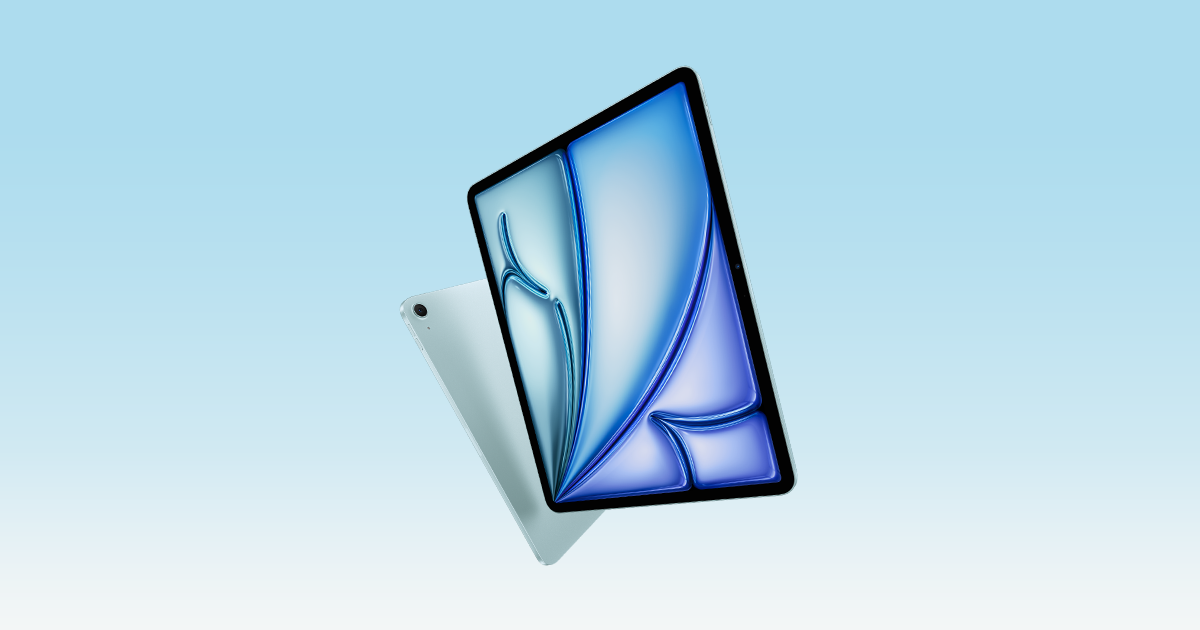
The best choice for most people is the Apple iPad Air 11-inch (M4) (9.3/10). Apple's 11-inch iPad Air with the M4 chip is the most complete tablet in this guide, combining top performance with the best app ecosystem.

Check price on Amazon

Also worth a look: OnePlus Pad 3 (Best Android Tablet); Apple iPad (A16) (Best Value iPad); Samsung Galaxy Tab S10 FE (Best for Note-Taking).

Top picks at a glance

1

Apple iPad Air 11-inch (M4)

Best Overall
9.3/10

Our take

Apple's 11-inch iPad Air with the M4 chip is the most complete tablet in this guide, combining top performance with the best app ecosystem.

Pros

  • Laptop-class performance that stays smooth with heavy multitasking
  • The deepest library of tablet-optimised apps of any platform
  • Long software support and strong resale value
  • Keyboard and Pencil accessories make it a real work machine

Cons

  • The 60 Hz display is less fluid than the fastest Android screens
  • Keyboard and Pencil cost extra

Full review

The 11-inch iPad Air with the M4 chip is the tablet we would point most people to. It pairs a laptop-class processor with 12 GB of memory, a sharp Liquid Retina display, Touch ID and the new Wi-Fi 7 connectivity, all in a slim body that is easy to carry around. Apple's own specifications confirm the M4 generation, and the extra memory over older Air models is what keeps heavy multitasking smooth when you run several apps side by side. What sets it apart from the rest of this list is longevity and ecosystem. iPadOS has by far the deepest catalogue of apps built specifically for a tablet screen, from drawing and video editing to note-taking and music production, and Apple supports its devices with updates for many years. If you already own an iPhone or a Mac, features such as AirDrop, handoff between devices and shared clipboard make it feel like part of one system. Support for the Apple Pencil and the Magic Keyboard turns it into a credible laptop replacement for students and remote workers. The trade-offs are the usual Apple ones. The display is a 60 Hz panel, so it does not feel as fluid as the 120 or 144 Hz screens found on some Android rivals, and the keyboard and Pencil are optional extras that add a lot to the final bill. Storage starts at 128 GB, which is fine for casual use but tight if you record video or keep large offline libraries. Even so, no other model here combines this much performance, software depth and resale value, which is why it takes the top spot for the widest range of buyers.
2

OnePlus Pad 3

Best Android Tablet
9.1/10

Our take

OnePlus's Pad 3 is the most powerful Android tablet here, with a 13.2-inch 144 Hz screen and a huge battery.

Pros

  • Flagship processor handles games and multitasking with ease
  • Large, very smooth screen suits films and split-screen work
  • Excellent eight-speaker audio
  • Very fast charging for such a big battery

Cons

  • Fewer apps optimised for large screens than iPadOS
  • Stylus and keyboard are optional extras

Full review

The OnePlus Pad 3 is the Android tablet to buy if you want flagship hardware without paying iPad Pro money. TechRadar's current tablet guide singles it out as its favourite Android slate, and Xataka Móvil also names it as its main recommendation in its value-focused buyer's guide. The reasons are easy to see: a Snapdragon 8 Elite processor, a large 13.2-inch 3.4K screen with a 144 Hz refresh rate, a 12,140 mAh battery and fast 80 W charging. The big panel makes it excellent for watching films, reading comics and working with two apps open at once, and the eight-speaker setup gives it one of the fullest sounds of any tablet we compare. Because the chip is the same family found in top Android phones, games and creative apps run without hesitation. The thin aluminium body is also pleasantly light for its size, which matters when you hold a 13-inch device on the sofa or on a train. The main caveat, noted by Xataka Móvil, is software: OxygenOS still has fewer apps designed specifically for large screens than iPadOS, so some Android apps look stretched. The stylus and keyboard are separate purchases, and a 13-inch tablet is simply bulkier than the 11-inch models below it. It also ranks second rather than first because the iPad Air offers longer update support and a richer app selection. If you prefer Android, want a big and fast screen and plan to use the tablet mostly for media, browsing and light productivity, this is the strongest choice in its class.

3

Apple iPad (A16)

Best Value iPad
8.9/10

Our take

Apple's A16 iPad is the simple, long-lasting choice for students and families who want the iPad ecosystem.

Pros

  • Affordable entry to the iPad ecosystem and its app catalogue
  • Smooth everyday performance and long update support
  • Works with a keyboard folio for study and light work
  • Sturdy, simple and easy to recommend to anyone

Cons

  • 60 Hz screen and an older Pencil standard
  • Less powerful and less refined than the iPad Air

Full review

The 11-inch iPad with the A16 chip is the cheapest way into the Apple tablet world, and the one we recommend to buyers who want the iPad experience without the Air's extra power. ProfesionalReview features it in its value guide and notes that it inherits many virtues from the Pro line: an 11-inch Liquid Retina display, a USB-C port, Touch ID and a 12-megapixel camera on both front and rear. For everyday jobs the A16 is more than enough. Browsing, streaming, video calls, schoolwork, light photo editing and most games run smoothly, and the base model starts at 128 GB of storage. Because it runs the same iPadOS as its pricier siblings, it gets the same app catalogue and, in all likelihood, many years of updates. It works with the Magic Keyboard Folio and, through an adapter, with the first-generation Apple Pencil, so it can double as a study device for taking notes and drawing. The compromises are clear. The screen is limited to 60 Hz, and it uses Wi-Fi 6 rather than Wi-Fi 7. Its display is not as refined as the Air's, and the Pencil situation is more awkward, since the newer USB-C Pencil is not listed as compatible. It is also the most expensive model in the budget-minded half of this list. Even so, for families, students and anyone who values long-term support and a simple, reliable tablet, it is a sensible and low-risk purchase that sits comfortably between entry-level Android slates and the Air.

4

Samsung Galaxy Tab S10 FE

Best for Note-Taking
8.7/10

Our take

Samsung's Galaxy Tab S10 FE bundles an S Pen and IP68 durability, making it the practical choice for note-takers.

Pros

  • S Pen included, ready for notes and drawing from day one
  • IP68 resistance is rare among tablets
  • microSD slot expands storage
  • Samsung Notes and DeX add productivity features

Cons

  • Mid-range chip trails the OnePlus and Apple models
  • Keyboard cover is sold separately

Full review

The Galaxy Tab S10 FE is the pick for anyone who writes, sketches or annotates a lot. Samsung includes the S Pen in the box, so you can start taking handwritten notes straight away without buying anything extra. Xataka Móvil's guide recommends the larger S10 FE+ sibling for the same strengths: the pen, Samsung Notes and the DeX desktop-style mode. The S10 FE shares that software, in a more compact 10.9-inch body. Its hardware is solid rather than spectacular. The Exynos 1580 chip is a mid-range processor, but it handles streaming, browsing, documents and casual gaming without fuss, and Samsung adds Galaxy AI features for summarising notes and translating text. The screen is large enough for reading and study, and the tablet carries IP68 water and dust resistance, which is rare in this category and gives peace of mind around kids or in a backpack. A microSD slot lets you extend storage up to 2 TB, a convenience that Apple does not offer at all. The downsides are the processor, which cannot match the OnePlus Pad 3 or the iPad Air, and a display that is a step behind the premium models. Samsung's software update promise is long for Android but still not as dependable as Apple's track record, and the keyboard cover is an extra. Because it comes with the pen and offers durability and expandable storage, it still earns its place as the most practical tablet for students who take handwritten notes or professionals who annotate documents all day, and it suits anyone already using other Samsung devices.

5

Xiaomi Redmi Pad 2

Best Budget Battery
8.4/10

Our take

Xiaomi's Redmi Pad 2 delivers a sharp screen and a 9,000 mAh battery for budget-conscious streamers.

Pros

  • Very long battery life for streaming and travel
  • Sharp 2.5K screen with a smooth 90 Hz refresh rate
  • Four speakers with Dolby Atmos
  • microSD slot for cheap storage expansion

Cons

  • Modest chip is not for demanding games
  • Slow 18 W charging

Full review

The Redmi Pad 2 gives you a lot of tablet for a modest outlay. ProfesionalReview includes it in its value guide, highlighting the 11-inch 2.5K display with a 90 Hz refresh rate and a 9,000 mAh battery, the largest in that comparison. For watching series on the sofa, reading or travelling, that combination of a sharp screen and long running time is hard to beat at this level. The sound is another strong point, with four speakers and Dolby Atmos support, and a microSD slot allows storage expansion up to 2 TB, which is useful for downloading films before a trip. The version we link has 8 GB of memory and 256 GB of storage, a more comfortable configuration than the 4 GB base model. The build feels solid, with a metal body that does not look cheap, and HyperOS is clean enough for everyday use. Where the Redmi Pad 2 saves money is in performance and charging. The Helio G100-Ultra chip is modest, so demanding games and heavy multitasking will show its limits, and the 18 W charging is the slowest of the models in that comparison, so a full recharge takes a while. Software support is not as long as Apple's or Samsung's, and accessories are less abundant. Make sure you pick the 11-inch model, since a differently specified smaller tablet shares the same name. For people who mainly want to stream, read, browse and video-chat, this is an excellent budget choice with outstanding battery life.

6

Lenovo Idea Tab

Best Entry-Level
8.0/10

Our take

Lenovo's Idea Tab is a pleasant, no-fuss entry-level tablet with a sharp screen and stylus support.

Pros

  • The lowest entry cost with a sharp 2.5K screen
  • Stylus often included for notes and drawing
  • Four Dolby Atmos speakers
  • Light, tidy metal design

Cons

  • Smallest battery of the six
  • Basic performance and Wi-Fi 5 only

Full review

The Lenovo Idea Tab is the most affordable tablet on this list, and one of the few at its level that does not feel like a compromise from the moment you pick it up. ProfesionalReview describes it as having no great weaknesses for what it costs. It offers an 11-inch 2.5K screen at 90 Hz, a metal finish and a stylus in the box in many versions, which is a combination you would normally expect from more expensive models. For simple tasks it does its job well. Streaming video, reading, browsing, social networks, video calls and homework all run without trouble on the Dimensity 6300 processor, and the four speakers tuned with Dolby Atmos give it better sound than its size suggests. The version we link has 8 GB of memory and 128 GB of fast UFS storage, running Android 15, which is a sensible setup for a household tablet that several people share. The limits are those of the price. The 5,100 mAh battery is the smallest here, so it will not last as long as the Redmi Pad 2 on a long journey, and the 20 W charging is unremarkable. Its memory and storage technology are less advanced than in the more expensive models, and it only has Wi-Fi 5 in the base version. It is not the tablet for games or creative work. But for children, grandparents, a kitchen or bedroom screen, or a first tablet on a tight budget, it offers a pleasant display, a pen and a tidy design, which justifies its place as the entry point of the ranking.

Frequently asked questions

Which tablet operating system should I choose?

Choose iPadOS if you want the widest choice of apps designed for large screens and long update support. Choose Android if you prefer more hardware variety, expandable storage or lower entry prices. If you already own an iPhone or a Mac, an iPad fits in easily, while Android phone owners will find an Android tablet familiar and quick to set up.

Do I need a tablet with mobile data?

Most people do not. If you mainly use the tablet at home or can share your phone's connection, a Wi-Fi-only model is cheaper and simpler. Mobile data is worth choosing for frequent travel, commuting or work outside the house. Check that the exact variant includes the connectivity you want, because the same name often covers both versions.

Is a stylus or keyboard worth buying?

It depends on how you use the tablet. A stylus helps if you take handwritten notes, draw or annotate documents, and a keyboard cover makes sense if you type for long periods or want to use it like a laptop. For streaming, reading and browsing you can skip both, and some models include a pen in the box.

How much storage do I need?

For streaming, browsing and schoolwork, 128 GB is usually enough, especially if you rely on cloud services. Choose 256 GB or more if you download films, play large games, edit video or keep many offline files. Some Android tablets accept a microSD card, which is an inexpensive way to add space later.

How long will a tablet keep getting updates?

It varies by brand. Apple supports iPads for many years, and some Android makers now promise several years of security and system updates, but the length differs between models. Before buying, check the manufacturer's update policy for the specific model, since a longer commitment keeps the tablet safe and useful for longer.

Buying guide

Choosing a tablet in 2026 is mostly a question of what you want it to replace. If it is a laptop for study or remote work, an iPad with a keyboard is still the most polished route. If it is a big screen for films and games, a large Android slate with a fast chip and a high refresh rate may suit you better. And if it is a simple screen for the sofa, the kitchen or the kids, a modest model with a good display and decent battery life is all you need. This ranking compares the tablets that come up most often in reviews and buyer's guides from outlets such as TechRadar, Xataka Móvil and ProfesionalReview, together with the manufacturers' own specifications, and it only includes models you can actually buy in Spain. We weigh four things above all. First, the software: iPadOS has the richest selection of apps made for large screens, while Android tablets vary a lot in how well their apps adapt. Second, the screen, where size, resolution and refresh rate decide how pleasant daily use feels. Third, the battery and charging speed, which matter far more for a tablet that lives on the sofa than a spec sheet suggests. Fourth, the accessories: a stylus and a keyboard cover can turn a tablet into a work tool, but they sometimes cost extra, so we note what comes in the box. The six models here cover the main buying profiles. The 11-inch iPad Air with the M4 chip is the most complete, the OnePlus Pad 3 is the best large Android option, the iPad with the A16 chip is the sensible entry to Apple's ecosystem, the Galaxy Tab S10 FE is built for handwritten notes, and the Redmi Pad 2 and Lenovo Idea Tab bring a sharp screen to people on a tight budget. Check the exact variant before you buy, since the same name is sometimes shared by versions with different memory, storage or connectivity, and decide whether you need mobile data or whether Wi-Fi is enough for you.

Ranking methodology

Our score out of 10 weighs what the reviews we consulted conclude about performance, build quality, ease of use and value for money. For tablets, screen quality, software depth and battery life carried the most weight, because they shape daily use more than raw speed. Where a criterion matters less, such as top performance for a simple streaming tablet, we look at how well the model does its own job instead. The score is a judgement, not an average.

Sources consulted Based on Xataka Móvil, ProfesionalReview, TechRadar, and 2 more

The reviews and data this ranking draws on. We do not run our own lab tests: we compare the findings of these publications.

Tags

More rankings you may like